
Valorant ESP: What It Shows and How to Use It Well
A clear explanation of ESP in Valorant, from the types of information it can show to settings that keep your screen clean.
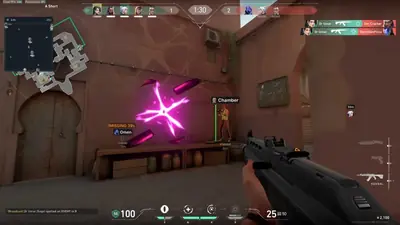
ESP stands for extra sensory perception. In Valorant it means an overlay that gives you information the normal game does not, usually about where other players are and what they are doing. It is the most common feature people look for, and also the easiest to set up badly.
What ESP can show
- Player boxes or outlines that mark enemy positions.
- Health indicators so you know whether to push or back off.
- Distance to each player.
- Names or agent labels, useful for knowing who you are facing.
- Skeleton view, which draws a simple frame of the player model.
Why more is not better
New users tend to switch everything on. The result is a screen full of labels, and you lose the thing that made ESP useful in the first place, which is quick, clear information. Start with outlines and distance only. Add health or agent labels later if you really use them.
Settings that help
- Pick contrasting colors. Choose colors that stand out against the maps you play most.
- Limit the range. Showing every enemy at every distance is noise. A reasonable range keeps the screen tidy.
- Use clear line thickness. Thin outlines vanish in busy scenes.
- Save a config. When you find a layout you like, save it so an update does not wipe your work.
Use it with common sense
ESP gives you information, but you still have to play. Rushing into every fight because you can see where people are is an easy way to look suspicious and get reported. Using the information to hold angles, time pushes and avoid bad fights is where it helps most.
A note on risk
Using any overlay in Valorant goes against Riot’s rules, and an account ban is always possible. Make decisions with that in mind, and read how bans work before you start.
Looking for a tool
If you want to see what our Valorant ESP options look like, the product page has the current feature details and compatibility information. For purchase checks first, see what to check before buying and aimbot settings.