
Valorant Aimbot Settings Explained: FOV, Smoothing and Keybinds
Understand FOV, smoothing, target selection and keybinds so your aimbot setup suits your playstyle instead of fighting it.
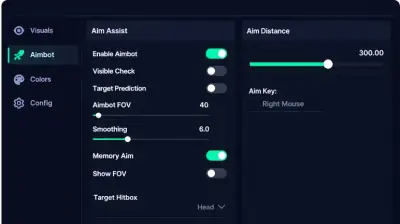
Most aimbot menus look the same at first glance: a handful of sliders, some toggles and a few keybind boxes. Knowing what each control does makes the difference between a setup that feels smooth and one that feels awkward.
Field of view
FOV sets how close a target has to be to your crosshair before the aim tool reacts. A small FOV means it only helps when you are already near an enemy. A large FOV means it reaches farther across the screen. Smaller values feel more natural for most people, because they work with your own aim rather than replacing it.
Smoothing
Smoothing controls how quickly the crosshair moves to a target. Low smoothing snaps fast. High smoothing moves slowly and gradually. Players who want their gameplay to look like normal play generally prefer more smoothing, even if it feels slower in the first few rounds.
Target selection
Most tools let you pick between head, chest or nearest bone. Head is the obvious choice, but not every weapon benefits. With a Sheriff or Operator, head priority makes sense. With a Spectre at close range, a body target can feel more reliable.
Keybinds
Hold to aim is usually better than a permanent toggle, since you decide exactly when the tool is active. Put the key somewhere you can reach without moving your hand off your movement keys.
Triggerbot and other add ons
A triggerbot fires when an enemy is under your crosshair. It works best alongside decent crosshair placement. Setting a short delay makes it feel less robotic than instant fire.
No setting removes risk
Careful settings can make play look more natural, but no configuration makes an account safe. Valorant bans for rule violations, and you should treat every account as one that could be lost. Understand ban types in Valorant before you decide, and compare with the ESP setup guide if you run both modules.
Next step
Product features vary, so check the current aim options on our Valorant aimbot product page before choosing a setup style.